
Displaying non-trackable shipments on the Tracking Page
The Seven Senders Portal enables you to display non-trackable shipments on the Tracking Page. In this section, you will learn how to configure the Tracking Page to properly support this use case.
How to Configure a Non-Trackable Shipment
To indicate that a shipment is non-trackable, use the trackable parameter in the POST /shipment request.
- Set trackable = false when creating a non-trackable shipment.
- For validation purposes, a tracking code is still required.
- For detailed API specifications, please refer to API.Sevensenders.com.
Once a shipment is transferred as non-trackable, the Tracking Page automatically adjusts its layout. Only three events are displayed on the Tracking Page for non-trackable shipments (see screenshot below).
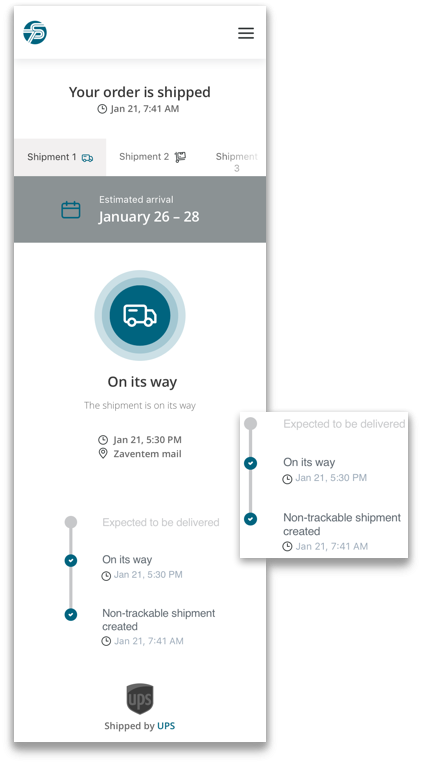
The table below shows the three events and their underlying logic:
| Event / Status Name | Logic |
|---|---|
| Non-trackable shipment created | Displayed once the shipment has been successfully created in the Seven Senders Portal. |
| On its way | Triggered based on the Planned Pickup Date parameter, once the planned pickup date lies in the past. |
| Expected to be delivered | Calculated as: Planned Pickup Date + Service Level Agreement (SLA). |
To display the event “Expected to be delivered”, Service Level Agreements (SLAs) must be configured in your Seven Senders Portal account. For more information, see Managing Service Level Agreements.
Updated about 4 hours ago